Quick Guide

Everything you can do with SiteMCP. Copy any prompt, paste it into Claude, and go.

A full example, start to finish

One real conversation, beginning to end — from a first description to a live site with its own images, a contact form, and a connected domain. Everything below uses real SiteMCP tools; nothing here is staged.

Claude — SiteMCP connected
Create a site for my business, Sunrise Bakery — a bakery in Austin, Texas. Our address, hours, and menu are in this file.
bakery-info.txt
create_site
create_page (home)
Your site is live: https://582910473.sitemcp.net

I read bakery-info.txt and used your address, hours, and menu items on the home page. Want to give me a sense of the look you're going for, before I go further?
Yes — here are two sites whose feel I like. Something between the two.

First reference screenshot the user attached — warm, cream and terracotta toned layout
reference-1.png
Second reference screenshot the user attached — clean, minimal, white and sage green layout
reference-2.png
update_theme_css
Got it — warm cream and terracotta tones with generous whitespace, closer to the first one, but with the cleaner spacing and lighter type from the second. I've updated your theme colors and fonts to match that direction. Let me know if you want it warmer, cooler, or more minimal.
That's it. Now add a Menu page and an About page.
create_page (menu)
create_page (about)
Done — Menu and About are both live and linked in the nav, styled to match your new theme.
Generate a hero image — fresh sourdough on a wooden counter, morning light.
generate_image
Here's the hero I generated: Generated hero photo of fresh sourdough bread loaves on a wooden counter in warm morning light
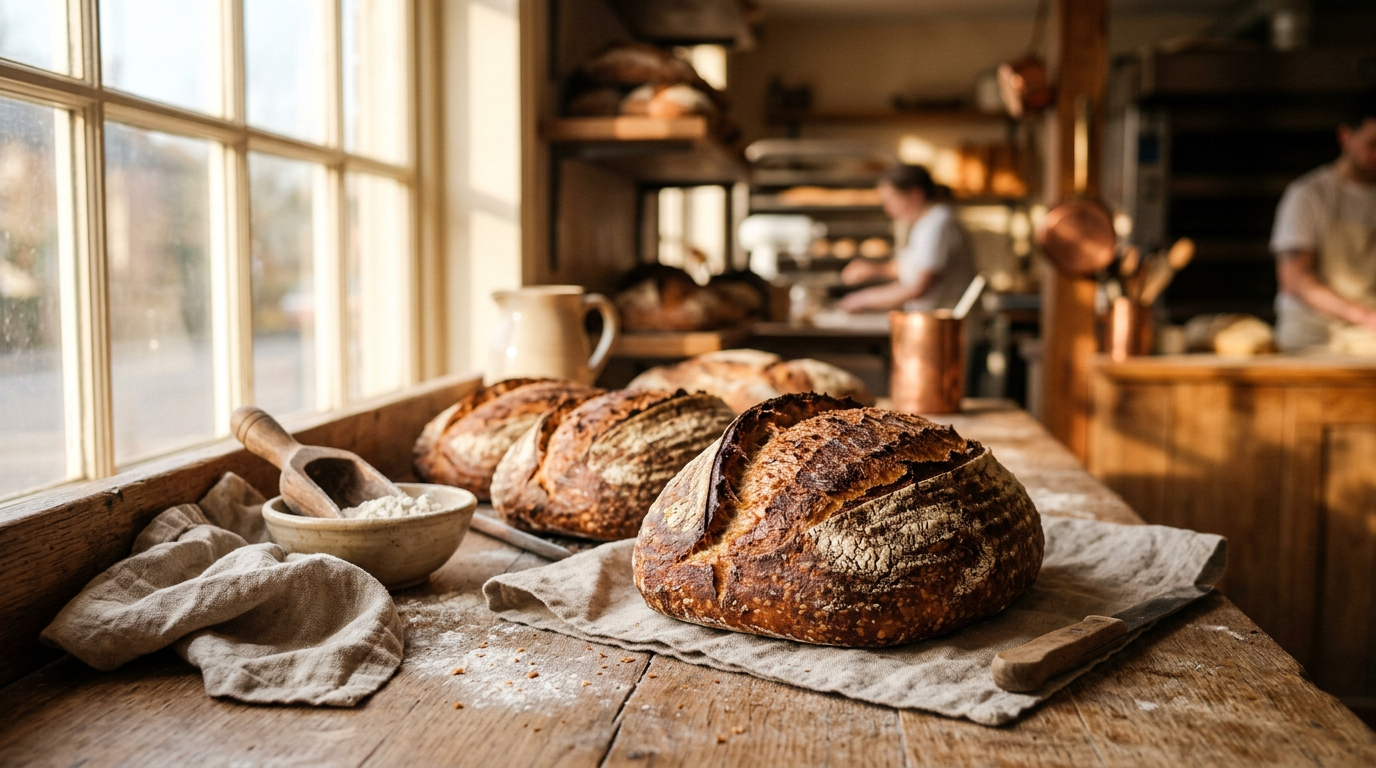
Placed at the top of your home page. Say the word for a different crop, mood, or time of day.
Love it, use it. Add a contact form, and our GA4 ID is G-9QF2K7XZLM.
add_contact_form
update_tracking
Done — contact form is live on the home page, and GA4 is tracking on every page. Ready for a custom domain whenever you are.
Yes — connect sunrisebakeryaustin.com.
connect_domain
Domain saved. One manual step left on your end — add a DNS record pointing at our server, then click "Notify us" in your dashboard. We'll finish connecting it within 24 hours.
No draft state — every change above went live on the site as it happened.

Real tools used: create_site, create_page, update_theme_css, generate_image, add_contact_form, update_tracking, connect_domain.

About the two reference screenshots. Claude takes general style direction from images you attach — colors, spacing, mood, type. It doesn't copy a specific site's design; it uses what you show it as inspiration, the same way you'd brief a designer.
Pages & Navigation

Add, edit, reorder, or remove pages just by asking. Claude keeps the navigation in sync automatically.

Create a page called Services listing what we offer and prices
Claude builds the page and links it in the nav in one step — no separate "publish" action.
Reorder my pages so Services comes right after Home
Uses reorder_pages to change the nav order without touching page content.
Rename the "Services" nav link to "What we offer"
update_nav changes the label shown in the menu without changing the page itself.
Make the About page my home page instead
set_home_page swaps which page loads at your root URL — useful if you restructure later.
List all my pages
Shows every page on the site with its URL — handy before asking for edits to a specific one.
Delete the old Testimonials page, we don't need it
Always asks for confirmation first, so nothing disappears by accident.
Design & Branding

Change colors, fonts, header, and footer without touching a stylesheet yourself — just describe the direction.

Change my color scheme to warm terracotta and cream tones
update_theme_css applies the new palette across every page at once.
Use a more modern, geometric font for headings
Claude can swap in a different web font and keep body text readable alongside it.
Add our phone number to the header, top right
update_header changes what appears across every page, not just one.
Add social links and a copyright line to the footer
update_footer edits the shared footer shown site-wide.
Show me the current theme CSS
get_theme_css is useful if you want to describe a precise tweak rather than a general direction.
Make the site feel more minimal — more whitespace, fewer colors
Plain-language direction works fine; you don't need to know CSS terms.
Images

Generate images from a description, match the style of something you attach, or upload your own photos.

Generate a header image — clean, modern, matching our brand colors
generate_image creates a new image from your description and places it for you.
Here are two sites whose look I like — match this general style
Attach the images in chat, then ask. generate_image_styled uses them as a style reference, not a copy source.
Upload this photo and use it as the About page image
Attach your own photo in chat — Claude uploads it and places it on the page you name.
Generate a new image in the same style as this one, but for the Menu page
Keeps a consistent visual style across multiple generated images on the same site.
List my saved images
Shows everything previously generated or uploaded for this site, ready to reuse.
That hero is too dark — try a brighter, warmer version
Regenerating is just another message — no need to start over.
Domain & Tracking

Connect your own domain and hook up analytics, all from the same conversation.

Connect domain mybusiness.com to this site
connect_domain saves the connection; your dashboard then walks you through the one DNS step.
Our GA4 ID is G-XXXXXXXXXX, set that up on this site
update_tracking turns on analytics across every page, no code to paste in yourself.
Add our Meta Pixel and Google Tag Manager container ID
Same tool handles multiple tracking IDs at once.
Add basic SEO meta for the home page based on our business info
update_seo_meta writes a title and description sized right for search results.
What tracking do we currently have set up?
get_tracking shows exactly what's live before you add anything new.
Update our business hours and phone number everywhere on the site
update_business_info changes it once and it's reflected wherever it's shown.
Migrating from an old site

Already have a site somewhere slower or more expensive to maintain? Describe it and Claude rebuilds it here, page by page.

Our current site is oldshopsite.com. Replicate it on SiteMCP, page by page
Tell Claude what each page covers — it rebuilds the structure and content here, not a pixel copy of the old design.
Match the same pages and navigation as the old site, but clean up the copy
A good moment to fix things you never liked about the original while you're already moving.
Keep our current logo and color scheme, just rebuild the pages
Attach your logo and describe your colors — Claude carries the branding over.
Once it looks right, connect our existing domain so it replaces the old site
Same connect_domain flow as any new site — point the domain here when you're ready to switch over.
Tips
You don't need to remember commands
Just describe what you want. Claude reads the built-in SiteMCP guide and picks the right tools automatically.
Attach files and images directly in the chat
A text file with your business info, a logo, reference screenshots, your own photos — Claude reads whatever you attach.
Editing works exactly like building did
Nothing to "unlock" or switch into edit mode — just tell Claude what to change, any time.
Set tools to "Always approve" in Claude
In Claude's connector settings, set SiteMCP tools to Always approve. Removes the popup on every tool call.
Deleting always asks first
Whether it's a page or a whole site, Claude confirms with you before anything is removed.
Running more than one site?
Just say which one — "on the bakery site, add a Menu page" — Claude keeps them separate.

Ready to try?

Connect SiteMCP and paste any prompt from this page into Claude.

Get started — 30 days free

No credit card required